


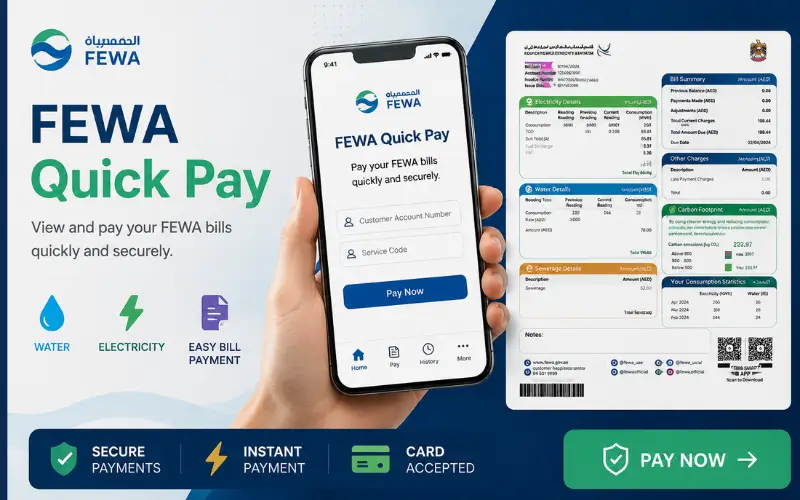
FEWA quick pay is a search term that many customers use when looking for a way to quickly check and pay electricity and water bills. Customers can access the service through EtihadWE. They can then use the View Bill to check their account, the amount owed, and make payment without having to log in. Customers can access the service online at any time, using EtihadWE’s mobile app or other payment methods.
It is a simple process that can be used to quickly settle a bill. For a standard online payment, you do not have to visit the service centre. Open the official EtihadWE site, select Services-View and Pay. Enter your account number. Review the bill. Select a payment method. Complete the transaction.
What Is FEWA Quick Pay?
FEWA Fast Pay is the online payment service for quick bill payments that many people are still searching under the old FEWA name. EtihadWE is the official provider of the service. Customers looking for the most recent payment method should visit the EtihadWE site rather than relying upon older FEWA sites.
Convenience is the main advantage. You can pay directly if you have the account number. The official service of EtihadWE states that customers may pay using the View and Pay Bill without having to log in. Customers who want to manage a household account, are in a rush, or do not wish to sign into a full-featured online account can use this service.
FEWA is now EtihadWE
Before searching for bill service, it is important to know that FEWA has changed to EtihadWE. While the old name is still widely used for searches, digital services are now provided by Etihad Electricity. You may still find old websites that refer to FEWA payment pages, or instructions from outdated times. The pages on these sites may not reflect current processes. Customers should check the service names on the EtihadWE official platform to ensure they are paying the correct amount.
EtihadWE’s eServices section currently includes View Bill Multiple accounts Payment Application status and other digital services. It is especially important to do this when entering sensitive data. Before entering any personal information, such as your account number, credit card details or other sensitive data, always ensure that you are using an official service.
What You Need Before Paying Your Bill
Online payment does not require complex preparation. You will need your EtihadWE Account number. The payment system can then retrieve the amount due based on your monthly invoice. Also, it is useful to have a valid email address and payment card ready. Official service recommends that customers use a valid email address and credit card when making payment.
Check your most recent bill, if you can. You can use this to identify the right account and prevent entering the wrong number.
Keep these details ready
- EtihadWE account number
- Valid payment card
- Active email address
- Reliable internet connection
Avoid unofficial websites which promise instant payment. Payment pages that are legitimate should clearly state the service provider, and use the official EtihadWE Platform.
How to Pay Your FEWA Bill Online
The current EtihadWE site offers a View Bill direct service if your primary goal is to quickly pay the bill. This option does not require you to be logged in to your full account. You will be asked to enter the account number and review the due amount, choose a payment option, accept the terms of the agreement, then enter your credit card information to complete the transaction.
EtihadWE’s website and mobile application offer the service, but other payment options include Al Ansari Exchange and EtihadWE Service Centres. On the official service page, it is listed that kiosks, banks, Al Ansari Exchange, and mobile apps are available 24 hours a day.
Quick Payment Without Logging In
It is a great option for those who don’t want to create a full online account. The Pay Bill Service allows you to start the payment directly from EtihadWE.
Follow the instructions on the page to make a payment. Check the bill amount displayed after entering the account number. It is important to do this if you have more than one utility or property account.
The current official service gives the following procedure:
- Visit the EtihadWE Website.
- Services
- Choose View and pay .
- Enter your account number.
- Select the payment method you prefer.
- Accept the Terms and Conditions
- Enter your card details.
- Make the payment.
FEWA Compare Quick Pay Options
You can pay your EtihadWE invoice in more than one way. You can choose to pay via your phone or at a physical point.
| Payment method | Login Required | Availability | Best for |
| EtihadWE Website | No View and Pay | 24 Hours | Pay online instantly |
| EtihadWE Mobile App | Account/payment options | 24 Hours | Mobile users |
| Payment Kiosk | No online login | 24 Hours | In-person digital payment |
| Partner Banks | Bank Dependent | Variations by channel | Customers of Banks |
| Al Ansari Exchange | No website login | Saturday-Thursday | Paying in person |
| Service Centre | No online login | Working hours | Personal Assistance |
These payment channels are confirmed on the current service page, along with their service hours.
Paying Through the EtihadWE Mobile App
If you’d rather manage your bill on your phone, the mobile app offers another option. Customers can choose the account they want, select a payment option, and complete their transaction using the app, according to official information. If you manage your utility account regularly, the app is a great way to access it without having to open a desktop web browser. Be sure to use the official EtihadWE app and have a good internet connection on your phone before making a payment.
Customers who wish to have all their utilities in one place, without having to search for payment pages every month, will also find the app useful.
Can You Pay More Than One Account?
Yes. EtihadWE lists Payment for Multiple Accounts separately as an eService. It can be helpful for organisations or customers who are responsible for multiple accounts. A person who manages multiple properties, for example may find it more convenient to pay several bills using the payment services available than by visiting each property separately.
Follow the instructions on the official EtihadWE website to determine the exact payment method.
Important Payment Limits and Card Rules
Before making any large transactions, customers should review the payment terms. On the current EtihadWE payment page, it states that a credit card can be used to pay up to AED 10, 000. It also lists a fee for amounts over AED 10, 000 of 0.0688. The page also states that payments by credit cards are only accepted for GCC-issued cards and that each credit card is limited to five transactions a day.
This information is especially important for customers with higher-valued bills, such as those in the business, agricultural, industrial and government sectors. On the official page, individuals and a variety of organisational types are identified as the main target audience for the payment service.
What to Do If Your Bill Payment Fails
It is possible that an online payment for utilities will not be processed due to a problem with your card, incorrect account details, an interruption in the internet, or a temporary problem with the payment service. Check to see if the amount has been deducted before attempting again.
Enter your account number carefully again if you do not see any money being deducted. Check that your card has enough funds and is active. If you’re not sure if the first payment was successful, avoid making subsequent payments. EtihadWE’s official website offers customer service for questions and complaints. The website currently lists 800-3392 for customer service and +9718003392 to support WhatsApp.
How to Confirm Your Payment
Keep the transaction or payment details after completing FEWA Fast Pay for your records. You can use this information if your bill is still unpaid or if you want to contact the customer service. Do not pay the bill again if your bank indicates that payment was made but utility accounts have not been updated. Save the transaction number, date of payment, amount and any other details. These details will help the customer service investigate the payment.
The official EtihadWE website offers customer support for complaints and enquiries. You can also contact the utility company if you cannot resolve a payment problem online.
Alternative Payment Methods for EtihadWE Bills
EtihadWE Bill Online payment is convenient but not the only way to pay. EtihadWE offers a variety of payment options for those customers who prefer a different method.
Included are:
- Kiosk machines
- Banks
- Al Ansari Exchange
- Al Fardan Exchange
- EtihadWE offices
These channels are listed on the official page for bill payment.
Customers can choose to pay online if it is convenient. Customers who prefer face-to-face service can visit an EtihadWE or exchange office. Customers who want digital assistance can access the Smart App or website.
Is FEWA Fast Pay Secure?
The safest way to pay a utility bill is through the official EtihadWE site. Entering account or credit card information onto an unofficial site that offers the same service is usually the biggest risk. Check the website address before making a payment to ensure you’re using the official EtihadWE site. Don’t share your PIN or password for your card, nor any one-time security codes.
Avoid clicking on payment links in unexpected messages. Open the official EtihadWE site and use the bill payment service there.
Why your account number matters
The account number is the link between your payment service and utility account. Customers must enter this number to complete the official payment process. Double-check before paying if you manage multiple properties. Payment to the wrong account may cause confusion, especially when there are multiple bills with similar amounts.
You should save your account number in a safe place so that you don’t have to look for it each month.
FEWA Fast Pay vs. Other Payment Methods
What you want and need will determine the best payment method. The View and Pay option on the EtihadWE site is the fastest way to pay online. Smart App is a good option if you manage your account regularly from your smartphone. Customers who prefer to pay in person can do so at kiosks, banks or exchanges. EtihadWE also has offices.
It is important that you only use EtihadWE-recognised channels to access all payment methods. It reduces the risk that you will use outdated instructions or non-official payment sites.
EtihadWE Customer Support
It is best to contact EtihadWE directly if you have any questions or problems with your account. Do not rely on unofficial websites for information.
The official website currently lists:
Phone: 800 3392 WhatsApp: +971 800 3392
Email: etihadwe.ae
These contact numbers are available on the official EtihadWE site, which was last updated in July 2026. Customer Support is useful if you have a question about a payment, enquire about your account, complain, or need assistance with service problems, complaints, or service issues.
Last Tips Before Paying your Bill
Online payment can be made easier and more secure with a few simple checks.
- Use the EtihadWE official website or Smart App.
- Before submitting your payment, check the account number.
- Check the amount due.
- Use a valid credit card.
- Keep the payment confirmation.
- Don’t share PINs or card security information, such as OTPs.
- Keep the transaction reference to contact EtihadWE if money is deducted from the bill but it does not update.
The EtihadWE official payment service allows customers to view their due amount and pay through digital channels.
Final Thoughts
If you are looking for FEWA quick pay the best thing to do is use the EtihadWE service and not an older or unofficial FEWA site. The View & Pay Bill feature is a simple way to pay your bill online and check the balance due without having to login. EtihadWE Smart App customers can also access payment kiosks, Al Ansari Exchange and service centers, as well as the EtihadWE Smart App. On the official website, it is listed that kiosks, banks, and mobile apps are available 24/7.
Check your account number, and the amount of your bill before paying. Keep the confirmation information after a successful transaction. Contacting EtihadWE directly in the event of a problem is the best way to solve the problem.
Read Also: Ajman Electricity Bill Quick Pay
Frequently asked questions
Does FEWA QuickPay still exist?
Yes. EtihadWE offers the service under View Bill.
Can I pay for a product without logging in?
Yes. Follow the payment steps.
What is required to pay my bill ?
In general, you will need your EtihadWE Account Number as well as a valid method of payment.
Can you pay via the mobile app?
Yes. Yes.
Can I pay for multiple accounts using ?
Yes. EtihadWE provides a Multi Accounts Payment Service.
What happens if I fail to pay?
First, check your account details and payment information. Keep the transaction reference to contact EtihadWE if money has been deducted from your account but the bill has not been updated.
How do I contact EtihadWE?
For payment and account problems, you can contact EtihadWE via its official customer support channels.
