


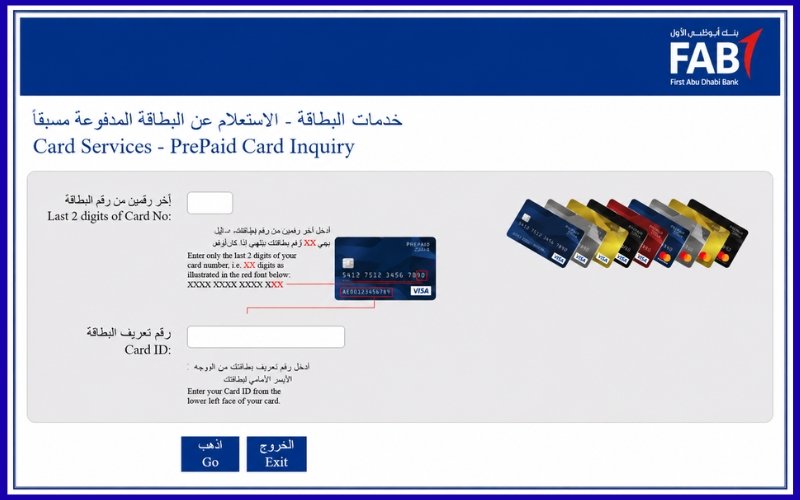
FAB Bank balance enquiry allows you to quickly verify your account balances, salary credits and recent transactions via official banking channels. First Abu Dhabi Bank provides a variety of secure options including online banking and mobile apps, ATMs, telephone banking, prepaid cards, and phone banking. Official method and when to use them, as well as how to protect your account information while checking your balance anywhere in the Emirates.
Understanding FAB Bank Account Enquiry
First Abu Dhabi Bank, one of the largest financial institutions in the region, serves personal, corporate, and business customers via an extensive digital network. Checking your account balance is important for managing daily finances. Customers check their account balances to confirm deposits of salaries, to monitor expenditure, to verify successful transfers or for sufficient funds prior making payments. Customers can securely access their information through multiple channels provided by the bank.
Digital balance inquiries are available 24/7, unlike visiting a branch. This makes them the preferred option for most account holders.
Official ways to check your balance
First Abu Dhabi Bank offers several safe methods to view your available funds. There are several options for you to choose from, depending on whether you prefer online banking or offline banking.
The most common methods are:
- Mobile Banking
- Online Banking
- ATM Balance Inquiry
- Phone Banking
- Ratibi Prepaid Card Portal
These methods can be accessed securely through the official banking services.
Check your balance through the FAB Mobile App
Mobile banking is the fastest way to access your account for most customers. Your dashboard will display your available balances, recent transactions, and other account information after you sign in using your registered credentials.
Customers can also manage transfers, card settings and utility payments as well as account notifications, statements and notifications through the app. The app includes security features like biometric authentication, OTP confirmation, and device registration to protect customer data.
The mobile app will usually update the balance as soon as the processing is completed.
Steps
- FAB Mobile App:
- Sign in securely.
- Verify all required information.
- Click on the Accounts tab.
- View your balance and transaction history.
View your balance through Online Banking
Customers who want a larger screen may use Online Banking via the secure web portal of their bank. Users can log in and review their balances on multiple accounts. They can also download statements, view transaction history, monitor deposit, and manage different banking services.
Customers who need to reconcile their business expenses frequently or print out statements for financial records will find online banking particularly useful. Customers should verify that the website is the official bank before entering their login credentials. This is because the service operates in a secure environment. When accessing financial data, it is best to avoid using public Wi-Fi.
Checking balance at an ATM
Customers without internet access can still use ATMs. Insert your debit card and enter your PIN. Select the option to check your balance, then select the account you want. The balance will be displayed on the screen. Many machines allow you to print out a receipt.
This is a great option for local travel or when there is no mobile data. ATMs confirm instantly the amount of money available before you withdraw cash. This reduces the risk of declined transactions.
Use Phone Banking
Customers who would prefer to speak directly with their bank can use telephone banking. Automated services or customer service representatives can help with account inquiries and balances after completing the identity verification. Phone banking can be particularly helpful if the internet is temporarily down or if you need to ask a question about your account.
Before disclosing account information, the bank may ask for security information to ensure that customer information is protected.
Check the balance of Ratibi salary cards
The employees who use Ratibi cards have a different enquiry process than those with standard bank accounts. The official prepaid inquiry portal allows cardholders with eligible cards to check available balances, without having to access full online banking.
In general, the user enters the card details, confirms the information and gets their available balance almost instantly. This service is particularly useful for employees who receive their salary through prepaid cards instead of conventional bank accounts. First Abu Dhabi Bank’s official Ratibi information also directs its customers to the prepaid balance inquiry services for cards supported.
Why regular balance checks are important
Regularly monitoring your account will help you to stay on top of your finances and reduce the chance that unnoticed mistakes or unauthorized activities may occur.
Regular balance checks can be helpful:
- Confirm your salary deposit.
- Detect unanticipated transactions
- Monitor your daily expenditures
- Avoid inadequate funds
- Budgeting monthly is easier.
This habit will make your financial management easier and give you more confidence when it comes to banking.
Checking a Ratibi Salary card’s balance
Many employees get their salary via a prepaid solution, rather than a traditional bank. The balance-checking procedure for these cardholders differs from the standard checking of current and savings accounts. Ratibi’s official balance enquiry service allows cardholders with the required qualifications to check their available funds without having to log into personal internet banking. Customers enter their card details through the official enquiry site, verify the information and then receive the available balance.
This service is especially useful for employees that want to verify their salary before making purchases or withdrawing money. The information is based on the most recent balance for the card, as it comes from the bank systems. To protect your personal information, only access the inquiry page via official First Abu Dhabi Bank websites and not third-party sites.
Understanding the Available Balance and Current Account
You may notice when checking your account that the balance available and balance current aren’t always identical. It is important to know the difference between these two terms so that you can avoid confusion when making transfers or payments. The balance that is available to be used right away represents the amount. The available balance is calculated by taking into account the completed transactions, any pending authorizations and any temporary restrictions that could affect your spending.
The current balance is the amount of money in the account, before certain transactions that are pending have been completed.
If you use your debit at a fuel station or hotel, for example, an authorization hold could reduce the balance available even though the final transaction hasn’t been completed. The account is adjusted once the merchant has completed the transaction. Knowing the figure to use helps customers avoid declined purchases and better manage their everyday expenses.
Features of Digital Banking that Support Better Account Management
Managing your finances is more than just checking your FAB balance check. FAB digital services make banking easier with additional tools. The customer can download account statements to view detailed transaction histories. This makes it easier to track income and expenses. Statements can be used for budgeting and financial planning as well as documenting transactions.
The platform supports Fund Transfer Services, which allows customers to transfer money between their accounts or to send funds to another beneficiary after completing required verification procedures. debit card is another valuable feature. Customers can track card activity and temporarily block a lost card or view recent transactions without having to visit a branch.
The integrated services allow customers to manage their finances more effectively and reduce the need to visit a bank.
Reasons why your balance may not update immediately
Customers expect that a recent transaction will appear in their account instantly. Nevertheless, a number of legitimate banking processes may cause temporary delays. Salary deposits are dependent on the time between when an employer submits their payroll and when they process the payment through the banking system. Transfers made between banks can take longer to process, particularly if they are initiated outside of normal banking hours. Sometimes, debit card purchases appear as pending before they become final.
Cash deposits made via certain machines may require verification as well before the updated balance can be displayed. These temporary differences are usually resolved automatically once processing is completed. Customers should contact customer service if a balance is incorrect for a long time.
What to do if you cannot access your balance
Customers sometimes have trouble checking their accounts. Most of the time, you can resolve your issue without having to visit a branch.
Some of the most common causes are:
- The login credentials are incorrect.
- Temporary Internet connectivity issues
- Maintenance schedules for systems.
- A card that is expired or blocked
- After repeated login attempts, security verification is required.
Contacting official customer service is your best option if troubleshooting does not solve the issue. Do not share passwords, OTPs or PINs.
Tips for checking your account
When customers adhere to recommended security measures, digital banking is extremely secure. To protect your account, you must practice good online habits. Do not share your passwords, pin or one-time passwords with anyone, even if that person claims to be a representative of the bank. Bank employees who are legitimate will not ask their customers for these credentials.
Verify that you’re using the official mobile app or website before signing in. Fraudulent sites can mimic real banking pages to steal login details. Remember to sign out of all shared computers and devices after every session.
If you receive an unexpected OTP or authentication request on your phone that you didn’t initiate, reject the request and contact your bank if needed. Enabling biometric verification, updating your mobile operating system, and installing updates for applications promptly are all ways to improve account security.
Digital Balance Enquiry Services: Benefits
Digital banking has changed the way that customers interact with their account. Customers can now access accurate account data almost instantly, without having to rely on visiting a branch. Convenience is a major benefit. Customers can check their account balance at any time, whether at home, work or while traveling in the Emirates.
Digital services improve financial awareness as they allow customers to track transactions on a regular basis. It is easier to identify patterns of spending, confirm payments and detect abnormal activity.
Electronic balance inquiries reduce waiting time and eliminate the need for routine account information to be obtained in a branch, making banking easier.
How To Monitor Your Banking Activities More Effectively
It is important to check your account balance, but it’s more useful to understand your overall financial situation. Regularly reviewing transactions allows you to identify recurring payments and unusual activity.
customers often check their balance only after they receive a paycheck or before making an online purchase. It is better to check your balance as well as your recent transactions at least once a week. This habit will make it easier for you to verify that all transactions, including card purchases, cash withdrawals, and transfers, have been correctly processed. Customers who receive regular payments can compare their monthly deposits to previous months in order to verify that the payroll amounts are accurate. Individuals who manage household expenses can also use transaction histories to better understand their spending patterns and to identify ways to improve budgeting.
Regular monitoring simplifies the process of keeping records. Customers can access a detailed history of their account through the official banking channels when preparing documents for financial purposes or reviewing monthly expenditures.
How to get the most out of banking notifications
Transaction notifications are one of the most useful features that digital banking offers. Alerts notify you when important account events occur. Notifications can include debit card purchases, salary deposits, ATM withdrawals and other account events.
These alerts have many advantages. The customer can manage their funds more easily when they know instantly what money is entering or leaving the account. Notifications can also add an extra layer of security by identifying unexpected activity quickly.
If a customer receives a notification for a purchase that they didn’t make, then they can contact the customer service team immediately, rather than waiting days to discover the problem. By enabling notifications, you can keep track of your everyday banking activities and reduce the risk of missing important transactions.
How to reflect salary deposits in your account
Salary credit day is the main reason why employees check their account balance. The payment must be processed by the bank before it can appear in the account of the employee. Processing times can vary based on the schedule of payroll submission, banking hours, public holidays, and weekends. Customers can confirm credit via mobile app, online banking platform or ATM.
The official prepaid enquiry system is available to employees who use prepaid solutions for payroll. Employees should confirm with their employer that they have submitted the payroll before contacting a bank if an expected salary does not appear after the normal processing time.
Understanding Pending Transactions
Customers often ask about pending transactions, and how they can affect the available funds prior to a payment being finalized. When a merchant has not fully processed a payment or purchase, a pending transaction will be placed on your account.
Common examples include:
- Reservations for hotels
- Fuel station purchases.
- Online Shopping Orders
- Restaurant payments are awaiting final settlement.
- Security holds for vehicle rental.
These authorizations may reduce the balance available, but they might not appear immediately as completed transactions. The pending authorization will be replaced by the final transaction amount once the merchant has completed processing. The final charge can sometimes differ from the authorization amount if there are adjustments made before settlement.
Understanding pending transactions can help customers avoid confusion by comparing the available funds to recent purchases.
Avoid these common mistakes when dealing with customers
The majority of balance inquiry issues are caused by simple mistakes, not technical problems. Good banking practices can reduce inconvenience and increase account security. Signing in via unofficial websites that you receive by email or SMS is a common mistake. Always access banking services through the official website, or official mobile app. Sharing confidential authentication information is another common mistake. Never give out passwords, PINs or one-time passwords to anyone.
Some customers forget to logout after using the banking services on a shared device. A session that is still active can create unnecessary security risks. Another mistake that can be avoided is ignoring software updates. Updated software often includes important security enhancements that protect customers’ information from newly discovered cyber threats. Customers should also review their transaction history regularly, rather than solely relying on the balance. Even a healthy balance does not always indicate unauthorized activity.
What to do if you notice an unauthorised transaction
It is crucial to act quickly if you find a transaction you don’t recognize. Start by reviewing the details of the transaction. Often, the merchant name is different from what customers know. This is especially true for online purchases and subscription services. Contact the bank immediately if the transaction is still unfamiliar. Representatives are able to review account activity and explain transactions if necessary. They can also recommend next steps.
Additional protective measures can include blocking a payment card temporarily, replacing it, updating the account credentials or, if applicable, initiating an official transaction dispute. The earlier suspicious activity is reported the easier it will be to investigate and protect your account.
How to Choose the Best Method for Balance Enquiry
Customers have different preferences when it comes to banking, so there is no one method that works for everyone. Mobile applications are preferred by customers who prefer convenience, as they provide instant access to account data from anywhere with an Internet connection. Online banking is often more convenient for those who want to review long transaction histories or download statements. This is because the screen size and account management tools are larger.
Phone banking is available for those who prefer to speak directly with an agent. The dedicated inquiry service is available to employees who use prepaid salary cards.
Conclusion
First Abu Dhabi Bank offers multiple channels to securely track your account balance. You can access your account balance using the FAB Mobile App, online banking or phone banking.
Checking your balance regularly helps you to confirm salary deposits, monitor expenditure, detect unauthorized transaction early and make informed decisions. You can have a convenient and safe banking experience by using the official FAB platforms.
FAQ:
The best option will ultimately depend on the individual customer’s needs, devices available, and preferred banking experiences.
How to check FAB balance?
If you have a prepaid salary card, you can check your balance using the FAB Mobile App, online banking or phone banking.
Is the FAB Balance Enquiry free?
Yes. In general, checking your account balance via the official digital banking channels are free. Your mobile service provider might charge standard data or internet charges.
Can My balance be checked online?
Yes. You can log in using your FAB registered credentials and securely view your account balance, recent transactions and account details.
Why Doesn’t My Balance Update?
It is possible that your balance will not update instantly due to pending transaction, processing time for salaries, interbank transfers or temporary system processing. Contact FAB’s customer service if the problem persists.
Can I use the mobile app?
Yes. You can check your account balance, view transaction history, transfer money, pay bills and manage your accounts using the official FAB Mobile App.
Is Online Banking Safe?
Yes. FAB protects customer information with encryption, secure login and multi-factor authentication. Never share your login details and only access the banking website.
How do I check the balance on my Ratibi card?
FAB Ratibi Balance Inquiry Service is available to eligible Ratibi cardholders by entering their card details, and then completing the verification.
Can I check my balance at an ATM?
Yes. You can check your balance by inserting your FAB debit cards into ATMs, entering your PIN and selecting the balance enquiry option.
What is Available Balance ?
The balance available is the amount that you can immediately spend or withdraw after taking into account pending transactions on your account and temporary hold.
Who should I contact for help?
Contact First Abu Dhabi Bank via its official customer service channels if you have any problems checking your account balance or suspect suspicious activity. You can also visit your nearest branch to get assistance.
